
MindLake Sync
Last updated 4 November 2026
MindLake’s own sync keeps your vaults in step across your Macs without iCloud Drive, end-to-end encrypted with a password only you know, with every device keeping a full copy as ordinary files and a version history of every note.
What it is
A vault syncs as a folder, and iCloud Drive or another sync tool can carry it (see Sync and backups). MindLake Sync is a place of its own: MindLake’s own servers relay your changes between your devices, encrypted on the device before they leave, so the server cannot read a note or even a file’s name. Every Mac keeps a complete, ordinary folder of Markdown on disk, and the server is only a relay and a history: cancel, go offline or lose the server entirely, and every note is still on every device.
| MindLake Sync | |
|---|---|
| Price | Part of MindLake Cloud, with Publishing and MindLake AI: 14 days free, then £9.99 a month or £99 a year. The same figures in euros and dollars. |
| Included | 10 GB, recordings included, and up to 5 vaults. |
| Encryption | End to end. Contents and file names are encrypted on your device with a key wrapped by your sync password. We cannot read your notes and cannot reset the password. |
| History | Every version of every file, for 12 months, for Previous Versions in a note’s ⋯ menu. |
| Devices | Every Mac. The iPhone side is on its way: a phone that joined earlier keeps syncing, and until it ships a new phone opens your vault through iCloud Drive. |
| Needs | A MindLake account (your email and a code) and MindLake Cloud. It does not need a MindLake licence: while you subscribe, MindLake Cloud also lets you use the Mac app without buying one. |
Turn it on
Three places offer it, all leading to the same short setup:
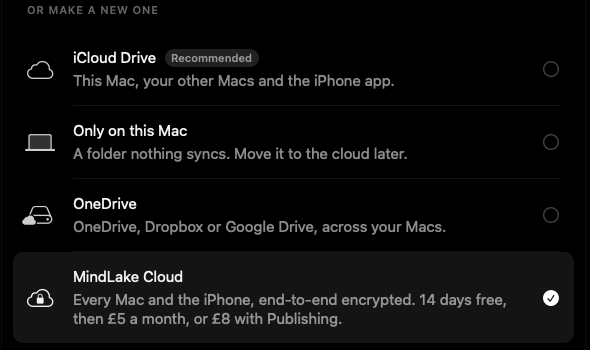
- The welcome’s vault step, as the fourth place for a new vault, MindLake Cloud: end-to-end encrypted, with Publishing and MindLake AI, 14 days free.
- Settings ▸ Sync, for the vault you have open.
- Settings ▸ General, a MindLake Cloud row beside your vaults home with Set Up Sync, and Settings ▸ Publishing, a MindLake Cloud row with Get MindLake Cloud… and Yearly beside it.
- Sign in with your email and the code sent to it. MindLake Sync uses your MindLake account, the same as Publishing and MindLake AI.
- Start the free trial with Get MindLake Cloud…, or Yearly beside it. The checkout opens in your browser; your card is taken there and nothing is charged for 14 days. Come back to MindLake and it carries on by itself.
- Choose a sync password of at least ten characters, typed twice. Your notes are encrypted with it on this Mac before they leave, so we cannot read them, and we cannot reset it: keep it somewhere safe.
- First Device makes the vault on your account and turns sync on. On your next Mac, choose Already Syncing instead, below.
If your vault is in iCloud Drive or another cloud folder
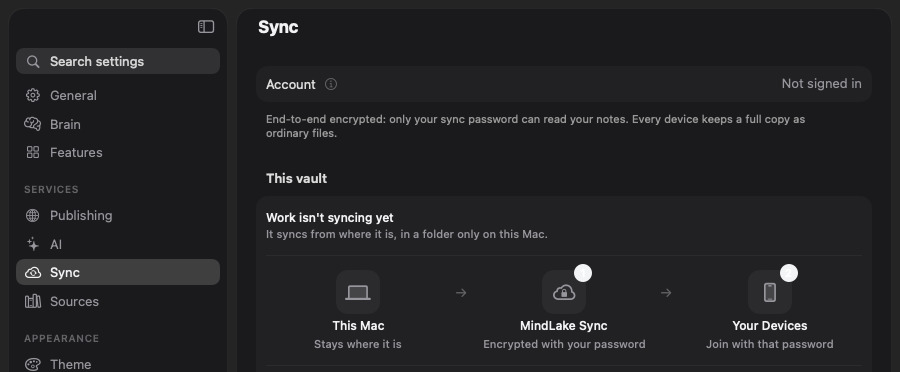
Two syncs on one folder is how notes get lost, so a vault in iCloud Drive or another cloud service has to move. Settings ▸ Sync says so, with the vault’s name, and draws the order things happen:
Choose… picks the folder on this Mac that will hold your vaults: your vaults home if it is on this Mac, else a MindLake folder in Documents. It must be on this Mac alone, not in a cloud folder and not a vault itself. The vault is copied there, never moved, off the main thread so the Mac stays responsive while a large vault copies; the copy becomes your vaults home, sync turns on and the copy opens. The original stays where it was, and the page says plainly that the two are then separate: move your other devices over soon, then delete the original. A copy already in the folder is used as it is, so it will not have changes made since. A vault in an ordinary folder on this Mac syncs where it is, with no copy.
Your next Mac
- Open Settings ▸ Sync, sign in with the same account, and choose Already Syncing.
- Enter the sync password you chose on your other Mac. Find My Vaults tries it against every vault on your account and offers the ones it opens by name.
- Click Sync name Here. The vault downloads into your MindLake folder on this Mac; nothing is copied from any original, so there is no second copy to merge.
A password that opens no vault on your account is said plainly. A vault that came to a Mac only through Sync can still open its locked notes: the file that holds the lock travels with the vault, so the passphrase, the recovery key and Touch ID work there too. See Notes and the editor.
Day to day
- Status. A small glyph beside the vault’s name at the foot of the sidebar: Synced, Syncing, Offline or Needs attention, with a tooltip saying why. Settings ▸ Sync shows the same, with Sync Now, the plan line (free trial until, or renews), storage used of 10 GB, and Manage… for the subscription.
- When it runs. A change on one device reaches the others within seconds while they are online. MindLake syncs when the vault changes, when it comes to the front and every minute, and backs off for a while after a failure; Sync Now ignores the wait.
- Two devices edit one note. The edits are merged against the last version both had seen. Where the merge cannot be clean, both versions survive, the other as
Title (conflict, device, date).md, listed in Settings ▸ Sync after the pass. A file that is not text keeps both copies. - A file is only ever replaced or deleted by sync if it is unchanged since the last sync. Anything else is a merge or a conflict copy. A first sync of a folder that already has notes joins the two sets; an empty or unreadable answer never deletes a local file.
- Many deletions at once are held back rather than sent, in case something went wrong on one device. Settings ▸ Sync says how many and offers Send the N Deletions.
- Previous Versions, in a note’s ⋯ menu, lists every version kept since the note first synced; choose one to read it, and Restore This Version… replaces the note with it, keeping the current text in the list.
- Sync recordings is a switch per device. Off, this device neither sends its recordings nor fetches other devices’, and never deletes one, here or anywhere: a small Mac can keep the notes and leave the audio behind. Recordings made on it stay there.
- Change… beside the password sets a new sync password; your other devices enter it next time.
- Stop on This Mac keeps the folder as ordinary files and stops syncing it; nothing on your other devices changes.
What syncs
Every file in the vault, including MindLake’s own hidden settings files: your tag rules, your filing corrections and the file that holds locked notes’ keys travel with the notes, so every Mac shares them. Hidden folders such as .git stay on the device they are in. Contacts, the search index and everything else MindLake keeps outside the vault stay on each Mac, as they do with any sync; see File format. Only the vault you have open syncs; another vault in your MindLake folder syncs when you open it.
If you stop paying, or forget the password
- Lapsing never takes a note. When the subscription ends, syncing stops and every device keeps its full copy as ordinary files. The server’s copy is kept for 30 days, so you can subscribe again or download it, then deleted.
- A forgotten sync password cannot be recovered, by us or by anyone. Your notes are not lost: they are on every device. Set a new password from a Mac that still has them, and the vault is encrypted again with it.