
MindLake AI
Last updated 4 November 2026
MindLake’s own AI, part of MindLake Cloud: the chat, summaries, titles, filing and the rest run on our account, with no AI account or key of your own, on your Mac and your iPhone, with a monthly allowance shown as a bar.
What it is
Until now MindLake’s AI features have needed something of yours: a model on your Mac, an AI app you already pay for, or your own key with a provider. MindLake AI is the fourth way: our own AI, ready to go, with nothing to install and no keys. It comes with MindLake Cloud, the one optional subscription, together with Sync and Publishing: £9.99 a month or £99 a year, the same figures in euros and dollars, with 14 days free. It does not need a MindLake licence, and while you subscribe MindLake Cloud also lets you use the Mac app without buying one; the iPhone app is free.
| MindLake AI | |
|---|---|
| Price | With MindLake Cloud, £9.99 a month or £99 a year (€9.99/€99, $9.99/$99), Sync and Publishing included. 14 days free, then cancel any time. |
| Where to subscribe | Settings ▸ Services ▸ AI on the Mac, or in the chat and Settings on the iPhone. The site’s services page sells it too. |
| What runs on it | The chat, summaries and write-ups, titles, tags and filing, Clean, Retag & Link, and the searches Find sources writes. |
| The allowance | Each month has an allowance, shown as a bar; during the free trial, it is a quarter of a month’s. When it is used up, MindLake AI stops until the next month starts. |
| Models | Standard for everyday questions; Think harder, a stronger model, for harder work. |
| Where it runs | Your request goes from your Mac to our server in London, which passes it to the model, run in Europe. Nothing you send is kept. |
Subscribe on the Mac
- Open Settings ▸ Services ▸ AI. MindLake AI is the first Connection tile; its section sits below the tiles.
- Sign in with your email and the code sent to it, if you are not signed in already. It is the same account as Publishing and Sync.
- Choose Get MindLake Cloud…, or Yearly beside it. The checkout opens in your browser; your card is taken there and nothing is charged for 14 days. Come back to MindLake and it carries on by itself.
Once subscribed, the section shows the month’s bar with what is left and when it resets, a choice of chat model (Standard or Think harder), and Manage…, which opens the subscription’s own page to change your card, see invoices or cancel. If a payment fails, the section says so, and MindLake AI stops until the card is updated.
Picking the MindLake AI tile makes it the connection the chat runs on. The row under the chat box can switch between it and your other connections at any time; see What the assistant can do.
The allowance
The allowance is measured by what each piece of work costs to run, not by a count of messages, so a short question costs almost nothing and a long write-up on Think harder costs more. It is shown in three places:
- Settings ▸ Services ▸ AI: the bar, with “62% left, resets 15 November”, or “Used up. Back on 15 November.”
- Under the chat box: the model’s name with what is left this month, redrawn after every reply.
- Before a long job: Write Up All in Organise says first how many write-ups the month’s allowance covers, and stops by itself if it runs out.
A day has a share of the month too, so one busy afternoon cannot spend the whole month; if you reach it, the chat says “Today’s share is used. Back tomorrow.” The month runs from one renewal to the next, and a yearly plan gets twelve month-long allowances. When the allowance is used up, the chat and the background features say so plainly and point at the model on your Mac or your own AI, which you can switch to in Settings ▸ AI while you wait. There are no top-ups.
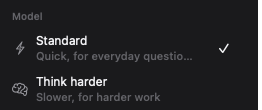
Standard and Think harder
Standard answers quickly and is right for everyday questions, summaries and edits. Think harder gives the chat a stronger model for a hard question or a long piece of writing, and costs more of the allowance. Pick one under the chat box, or set the default in Settings ▸ Services ▸ AI; a change applies from your next message. The background features always run on Standard.
Settings ▸ AI ▸ Advanced lists each feature with what it really runs on. On MindLake AI, every row says Standard, except where you have chosen to keep a feature on this Mac, such as titling or summaries with a model you have downloaded, which stays private and costs nothing.
On the iPhone
Tap or flick the magnifying glass in the search bar to switch from Search to Ask, type a question about your notes, and MindLake AI answers from your vault, showing the notes it read. It knows your folders, tags and people, can list your tasks by due date, folder, tag or person in one go, finds the notes on a subject ranked best first, and knows today’s date, so “last week” and “tomorrow” mean what you mean.
- Tasks in a reply are rows you can tick, with the due date and priority as small marks and the note underneath; ticking updates the note itself.
- Headings, lists, tables and code in a reply are drawn properly, and any note a reply names opens with a tap.
- Your chats are kept with your notes, so a conversation started on your Mac carries on here and the other way round. Chats, in the notes menu, opens past conversations; a new chat shows your recent ones under the starter questions, and + in the message box mentions a note.
- Settings ▸ MindLake AI picks the model (Standard or Think harder), what it may do to notes (Ask, Read only, or Change notes freely) and whether the search bar starts in Search or Ask.
Subscribing on the iPhone
An account without MindLake AI sees MindLake Cloud in the chat and in Settings, at the App Store’s prices, with Restore Purchases. Subscribing in the app, monthly or yearly, starts with the free trial, once per Apple Account; the plan’s price is charged after that unless you cancel. It is the same MindLake Cloud the Mac uses: buy it on either and it works on both, and Manage opens wherever it is billed. The phone needs to be signed in to your MindLake account first; see MindLake on iPhone.
What we keep
Your message, the note or notes in its scope and what the assistant reads from your vault go from your device to our server in London, which passes them to the model, run in Europe. The model’s provider keeps none of it and never trains on it. Our server keeps no text at all: only who asked, when, which feature, how many tokens went in and out and what they cost, for 13 months, so the bar can be drawn and the bill checked. Nothing about you goes to the provider. If MindLake AI cannot answer, your request fails cleanly and is never sent anywhere else. See Privacy and data and the Privacy Policy.