
Watched folders
Last updated 4 November 2026
Choose folders on your Mac, and any audio or video file that lands in one becomes a note with a transcript on its own, while the original stays exactly where it was.
What a watched folder does
Settings ▸ Watched Folders, under Transcription on the Mac, is for recordings that arrive without you: a voice recorder that saves to a folder, a call app that drops its recordings in Downloads, a phone that syncs its memos to a cloud folder. Add the folder, and each audio or video file that lands there becomes a note with its recording and a transcript, exactly as if you had dropped the file on MindLake. Nothing opens while it works, and your file is never moved or changed.
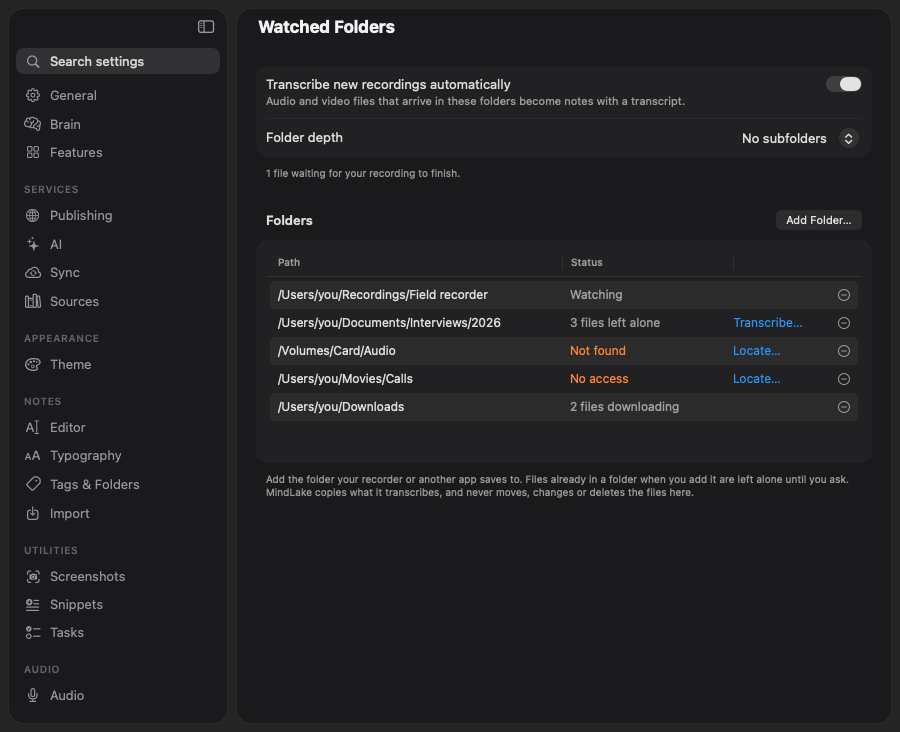
Set it up
- Transcribe new recordings automatically is the switch for the whole feature.
- Folder depth decides how far into subfolders MindLake looks: No subfolders, or one to several levels down.
- Add Folder… chooses a folder. Choosing it through the file dialog is what gives MindLake lasting access to it, so Documents, Desktop and Downloads work without asking again at the next launch.
- The × at the end of a row stops watching that folder. Nothing already made from it is touched.
Files already in a folder when you add it are left alone. The row says how many, and Transcribe… on the row offers to make a note from each of them, one at a time, after asking first. The same holds for anything that comes into view later: raising the depth, or switching the feature off and on, never starts a backlog. Files that arrive while MindLake is closed do count: the folder is still watched, and that is what a watched folder is for.
What the status column says
| Status | Meaning |
|---|---|
| Watching | Nothing to do right now. |
| N files arriving | A file is still being written; MindLake waits until it has held still for ten seconds and opens as a recording. |
| N files downloading | A file still in the cloud has been asked to download. It is picked up on a later look; files left alone stay in the cloud. |
| N files left alone | Files that were already there when the folder was added. Transcribe… takes them. |
| N files unreadable | A file that never opened as a recording, after ten minutes of trying. |
| Not found | The folder has gone, or is in the Bin. Watching resumes if it returns; Locate… points MindLake at it. |
| No access | macOS refused the folder. Locate… chooses it again through the file dialog. |
| Inside your vault | Notes keep their recordings in the vault, so watching it would transcribe them again. Choose a folder outside it. |
A line under the list says why files are waiting: for a transcription model (download one in Settings ▸ Local Models), for MindLake to be unlocked, or for your own recording to finish. The rest of a row’s story is in its tooltip.
How it decides
- Never twice. MindLake knows a recording by its content, not its name. A file renamed, moved between watched folders or copied a second time is the same recording and is not transcribed again. A different recording under the same name is new.
- One at a time. The next file goes in only when nothing is transcribing, so a batch does not start everything at once.
- Not while you record. MindLake does not even look at the folders during a take. A transcription already running carries on.
- Not without a model. With no speech model downloaded, files wait and the page says so, instead of asking you mid-afternoon.
- Checked every few minutes, and the moment a file changes, a drive comes back or MindLake comes to the front.
Formats and limits
Any audio file the Mac can play is taken, such as M4A, MP3, WAV, AIFF and FLAC, along with MP4 and MOV video, the same files you could drop on MindLake. A video is copied into the vault whole, as a dropped one is. The record of what has been seen is kept on each Mac: two Macs watching the same synced folder both see a new file, and the second usually finds the first one’s note and stops, unless it gets there before the note has synced.